Rebecca Han:微信小程序仿知乎Demo實(shí)戰(zhàn)教程(適用1028版本)
從微信小程序開(kāi)始內(nèi)測(cè)到現(xiàn)在, 已經(jīng)一個(gè)月過(guò)去了,終于把我自己的微信小程序 demo 墨跡完成了. 真的是墨跡完的, 連我自己都佩服自己的拖延癥了(懶癌少女已棄療*ヾ(´A`)ノ?*), 總之算是基本完成了(明明有很多組件啊 ...
之前有很長(zhǎng)一段時(shí)間我算是知乎重度依賴(lài), 所以這次 demo 的模仿對(duì)象選擇的是知乎(但是寫(xiě)到一半發(fā)現(xiàn)我這個(gè)決定坑了, 這是后話(huà)).
demo 的界面設(shè)計(jì)以及交互設(shè)計(jì)均來(lái)自于知乎 Android 版本
- _工具_(dá): [微信 web 開(kāi)發(fā)者工具](https://mp.weixin.qq.com/debug/wxadoc/dev/devtools/download.html?t=1477579747265)
- 已經(jīng)全面對(duì)非邀請(qǐng)內(nèi)測(cè)用戶(hù)開(kāi)放, 且在持續(xù)更新
(我碼代碼的過(guò)程中就更新了兩版, 所以開(kāi)發(fā)時(shí) IDE 版本不唯一)
不過(guò)其實(shí)忍受了半個(gè)小時(shí)微信的開(kāi)發(fā)者工具之后, 我就改在 webstorm 中編輯了, 微信工具成了運(yùn)行預(yù)覽的工具, 不過(guò)聽(tīng)說(shuō)IDE 中預(yù)覽的效果, 也不能保證與真機(jī)一樣哦~
- _設(shè)計(jì)和功能_: 知乎安卓版本 非常之簡(jiǎn)易版
- _數(shù)據(jù)_: 畢竟是知乎, 為了防止版權(quán)問(wèn)題, fake 的數(shù)據(jù)使用的是我自己的回答, 所以...
1. 基礎(chǔ)文件
app.json:
{
  "pages":[
    "pages/index/index",
    "pages/discovery/discovery",
    "pages/notify/notify",
    "pages/chat/chat",
    "pages/more/more",
    "pages/answer/answer",
    "pages/question/question"

  ],
  "window":{
    "backgroundTextStyle":"light",
    "navigationBarBackgroundColor": "#0068C4",
    "navigationBarTitleText": "知乎",
    "navigationBarTextStyle":"white",
    "enablePullDownRefresh":true
  },
  "tabBar": {
    "color": "#626567",
    "selectedColor": "#2A8CE5",
    "backgroundColor": "#FBFBFB",
    "borderStyle": "white",
    "list": [{
      "pagePath": "pages/index/index",
      "text": "",
      "iconPath": "images/index.png",
      "selectedIconPath": "images/index_focus.png"
    }, {
      "pagePath": "pages/discovery/discovery",
      "text": "",
      "iconPath": "images/discovery.png",
      "selectedIconPath": "images/discovery_focus.png"
    }, {
      "pagePath": "pages/notify/notify",
      "text": "",
      "iconPath": "images/ring.png",
      "selectedIconPath": "images/ring_focus.png"
    }, {
      "pagePath": "pages/chat/chat",
      "text": "",
      "iconPath": "images/chat.png",
      "selectedIconPath": "images/chat_focus.png"
    }, {
      "pagePath": "pages/more/more",
      "text": "",
      "iconPath": "images/burger.png",
      "selectedIconPath": "images/burger_focus.png"
    }]
  },
  "networkTimeout": {
    "request": 10000,
    "downloadFile": 10000
  },
  "debug": true
}
app.json文件中是對(duì)整個(gè)小程序的全局配置, 主要用到的字段有pages, window, tabBar, networkTimeout.
* pages 字段: 所有小程序的頁(yè)面都要在該字段中注冊(cè), 該字段數(shù)組中的第一個(gè)page 默認(rèn)為小程序首頁(yè)(設(shè)置tab 除外), 沒(méi)有在 pages 字段注冊(cè)過(guò)的頁(yè)面貌似不能夠進(jìn)行有效的編譯(之前版本的編輯器可以,只是會(huì)影響配置文件等的生效, 編輯器更新后會(huì)報(bào)未注冊(cè)的錯(cuò)誤).
* window 字段: 大多是關(guān)于小程序頂部 navigationbar 的一些設(shè)置
* tabBar字段: 如果你需要首頁(yè)面底部帶tabbar的樣式, 那么就在 tabBar 字段中設(shè)置每個(gè) tab 對(duì)應(yīng)的頁(yè)面, 按順序?qū)?yīng)左至右, 包括路徑, tab 文字, tab圖標(biāo)和選中狀態(tài)圖標(biāo).
* netwoTimeout: 設(shè)置網(wǎng)絡(luò)超時(shí)時(shí)間.
* debug: 開(kāi)啟 debug 模式.
app.wxss 文件中為全局樣式, 也就是說(shuō)這個(gè)文件中的樣式在所有的 page 中均可使用, 若其他頁(yè)面文件的 wxss 中定義了與該樣式文件中相同的屬性, 則該文件中的樣式被覆蓋, 規(guī)則與 css 優(yōu)先規(guī)則大致相通.
app.js: 調(diào)用 login接口, 回調(diào), 周期函數(shù), 本地存儲(chǔ)等等邏輯代碼.
2. 頁(yè)面文件:
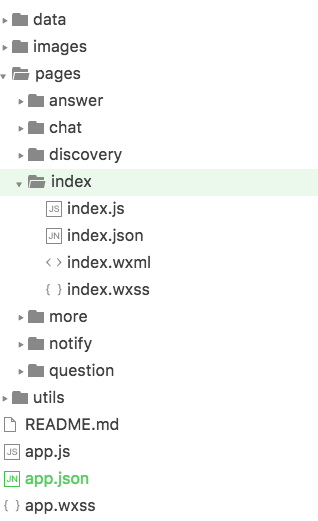 頁(yè)面文件由四部分組成
例如我們有一個(gè)首頁(yè)叫做 index, 則需要在 pages 文件夾下創(chuàng)建文件名相通的三個(gè)必要文件:
- index.wxml
- index.wxss
- index.js
*另外 index.json文件為可選, 功能與 app.json 相同, 為該頁(yè)面的配置文件, 但定義功能有限.*
3. UI
跟平時(shí)開(kāi)發(fā)一樣, 最開(kāi)始當(dāng)然是碼 UI
除了需要依照微信的一些新的標(biāo)簽和樣式規(guī)則, 其他與平時(shí)碼 UI 并沒(méi)有太大的不同
需要強(qiáng)調(diào)的是, flex 布局在微信小程序中 hin~~~~好用
不過(guò), 同時(shí)作為女生和程序員, 不挑刺可就不是我了, 所以下面列舉了一些我遇上的坑, 其中有些也許不正確(多多包涵啦\(//?//)\), 有些也許已在 IDE 更新中修正
坑們:
1. 有一些 css 樣式在微信 IDE 中不支持, 例如 font-weight, letter-spacing(及類(lèi)似調(diào)整字間距的樣式)等
2. <text/>不支持嵌套, 兩層<text/>嵌套的結(jié)構(gòu)下, 內(nèi)層<text/>中的內(nèi)容會(huì)連續(xù)顯示兩次
(在 IDE 后續(xù)更新中已修正)
3. 若<view/>與<text/>在結(jié)構(gòu)上并列的話(huà), 顯示上會(huì)重合, 感受上類(lèi)似<view/>級(jí)別高于<text/>, 防止內(nèi)容相疊, 必須使用<view/>相并列. 所以并不能像某些地方說(shuō)的, 把<view/>當(dāng)做<div>去使用!
4. 元素之前有垂直相鄰 margin 的時(shí)候(符合 margin 折疊規(guī)則), 在微信小程序中會(huì)double 顯示, 即兩個(gè)元素的 margin 均攤開(kāi), 不遵循 margin 折疊規(guī)則.
5. <view/>標(biāo)簽 hidden 屬性無(wú)效 ( v0.10.101400 中已修正 )
6. 部分情況下, 平級(jí)標(biāo)簽 A 與 B 并列, 當(dāng) B 通過(guò)某些調(diào)整向 A 元素位置相疊的時(shí)候, 微信 IDE 解析出的效果是 A 的內(nèi)容和背景色會(huì)覆蓋 B 元素與之重疊的部分. ( 普通瀏覽器解析應(yīng)該是 B 覆蓋 A ).
7. 如果用模板+列表渲染的方式來(lái)渲染數(shù)據(jù)的話(huà), 在模板中使用列表渲染的{ {item}}是無(wú)效的, 無(wú)法被正確識(shí)別, 所以列表渲染的時(shí)候要把復(fù)用的部分寫(xiě)在列表渲染的代碼塊內(nèi) ( 屬于數(shù)據(jù)渲染部分, 后面會(huì)提到 )
( 待續(xù)... ... )
后面將對(duì)于一些我 demo 中寫(xiě)到用到的部分進(jìn)行說(shuō)明
列表式的數(shù)據(jù)渲染
首頁(yè)
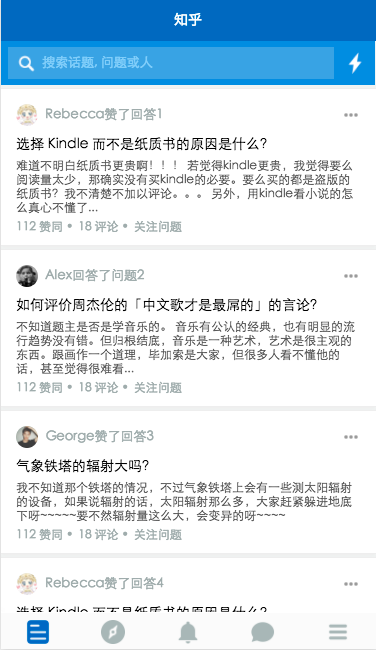
類(lèi)似于首頁(yè)以及發(fā)現(xiàn)頁(yè)這種標(biāo)準(zhǔn)列表式的數(shù)據(jù)展現(xiàn)方式, 微信提供了很好的方案---列表渲染
<block wx:for="{{feed}}" wx:for-index="idx" wx:for-item="item" data-idx="{{idx}}">
   <view class="feed-item">
       <view class="feed-source">
           <a class="">
               <view class="avatar">
                   <image src="{{item.feed_source_img}}"></image>
               </view>
               <text>{{item.feed_source_name}}{{item.feed_source_txt}}</text>
           </a>
           <image class="item-more" mode="aspectFit" src="../../images/more.png"></image>
       </view>
       <view class="feed-content">
           <view class="question" qid="{{question_id}}" bindtap="bindQueTap">
               <a class="question-link">
                   <text>{{item.question}}</text>
               </a>
           </view>
           <view class="answer-body">
               <view bindtap="bindItemTap">
                   <text class="answer-txt" aid="{{answer_id}}">{{item.answer_ctnt}}</text>
               </view>
               <view class="answer-actions" bindtap="bindItemTap">
                   <view class="like dot">
                       <a>{{item.good_num}} 贊同 </a>
                   </view>
                   <view class="comments dot">
                       <a>{{item.comment_num}} 評(píng)論 </a>
                   </view>
                   <view class="follow-it">
                       <a>關(guān)注問(wèn)題</a>
                   </view>
               </view>
           </view>
       </view>
   </view>
</block>
可以直觀(guān)的看出, 就是 for 循環(huán)來(lái)用重復(fù)的結(jié)構(gòu)渲染一組數(shù)據(jù)
- for="{{}}"中的內(nèi)容是想要循環(huán)的一組數(shù)據(jù), 最外層為數(shù)組結(jié)構(gòu)
- for-item 指定數(shù)組中當(dāng)前元素的變量名
- for-index 指定數(shù)組中當(dāng)前元素下標(biāo)變量名
同樣也使用了 for 渲染的還有頂部的發(fā)現(xiàn)頁(yè)和通知頁(yè)等頂部的自定義 tabbar
頂部 tabbar 實(shí)現(xiàn)
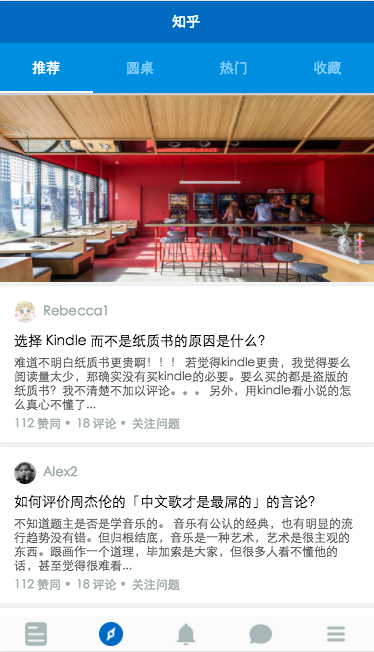
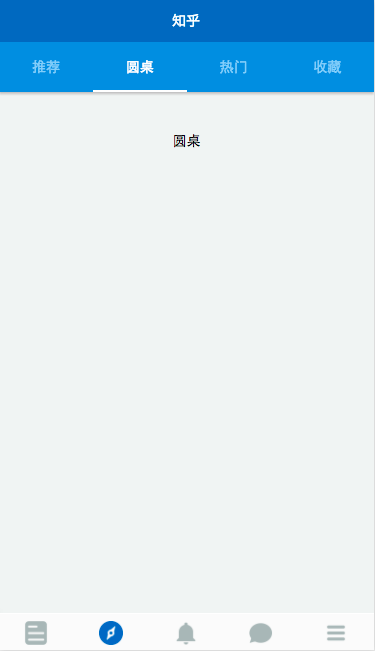
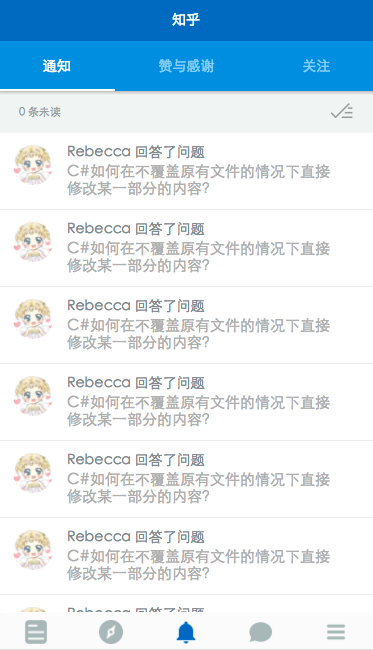
微信只提供了底部 tabbar, 所以頂部的要自己寫(xiě)嘍~
頂部 tabbar 的實(shí)現(xiàn)在于 for 列表渲染以及 js 配合
wxml:
<view class="top-tab flex-wrp flex-tab " >
  <view class="toptab flex-item {{currentNavtab==idx ? 'active' : ''}}" wx:for="{{navTab}}" wx:for-index="idx" wx:for-item="itemName" data-idx="{{idx}}" bindtap="switchTab">
    {{itemName}}
  </view>
</view>
<scroll-view scroll-y="true" class="container discovery withtab" bindscrolltoupper="upper" bindscrolltolower="lower"  scroll-into-view="{{toView}}" scroll-top="{{scrollTop}}">
  <view class="ctnt0" hidden="{{currentNavtab==0 ? '' : true}}">
  </view>
  <view class="ctnt1 placehold" hidden="{{currentNavtab==1 ? '' : true}}">
    <text>圓桌</text>
  </view>
  <view class="ctnt2 placehold" hidden="{{currentNavtab==2 ? '' : true}}">
    <text>熱門(mén)</text>
  </view>
  <view class="ctnt3 placehold" hidden="{{currentNavtab==3 ? '' : true}}">
    <text>收藏</text>
  </view>
</scroll-view>
js:
//discovery.js
Page({
  data: {
    navTab: ["推薦", "圓桌", "熱門(mén)", "收藏"],
    currentNavtab: "0"
  },
  onLoad: function () {
    console.log('onLoad')
  },
  switchTab: function(e){
    this.setData({
      currentNavtab: e.currentTarget.dataset.idx
    });
  }
});
由于微信不支持任何 dom 和 window 對(duì)象, 所以 tabbar的實(shí)現(xiàn)依賴(lài)于微信提供的視圖層的展示邏輯, 以及視圖與數(shù)據(jù)之間的綁定機(jī)制.
綁定點(diǎn)擊事件, 通過(guò)改變一個(gè) data- 屬性的值, 來(lái)控制元素的類(lèi)的改變( 從而改變樣式等 )
輪播圖
<swiper class="activity" indicator-dots="{{indicatorDots}}"
       autoplay="{{autoplay}}" interval="{{interval}}" duration="{{duration}}">
 <block wx:for="{{imgUrls}}">
   <swiper-item>
     <image src="{{item}}" class="slide-image" width="355" height="155"/>
   </swiper-item>
 </block>
</swiper>
imgUrls: [
 '../../images/24213.jpg',
 '../../images/24280.jpg',
 '../../images/1444983318907-_DSC1826.jpg'
],
indicatorDots: false,
autoplay: true,
interval: 5000,
duration: 1000,
feed: [],
feed_length: 0
輪播圖的實(shí)現(xiàn)使用的是微信提供的 swiper 組件, 該組件貼心的提供了各種屬性選擇, 常用的包括autoplay, interval 時(shí)間, duration等
<swiper-item>中包含的是所有輪播的圖片, 為了方便修改圖片數(shù)據(jù), 同樣采用 for 渲染綁定 data 的方式
下拉刷新, 上拉加載, 以及數(shù)據(jù)請(qǐng)求
刷新及繼續(xù)加載的動(dòng)作, 依靠的是<scroll-view>標(biāo)簽, 及配套的upper 和 lower 事件
<scroll-view>標(biāo)簽的屬性提供了 bindscrolltoupper 和 bindscrolltolower來(lái)綁定滾動(dòng)到頂部及底部所觸發(fā)的事件, 同時(shí)upper-threshold 和 lower-threshold 能夠調(diào)整觸發(fā)時(shí)距邊界的距離
除上述之外, 還提供橫向滾動(dòng), 滾動(dòng)觸發(fā)事件, 及設(shè)置滾動(dòng)條位置等...
<scroll-view scroll-y="true" class="container" bindscrolltoupper="upper" upper-threshold="10" lower-threshold="5" bindscrolltolower="lower"  scroll-into-view="{{toView}}" scroll-top="{{scrollTop}}">
    <block wx:for="{{feed}}" wx:for-index="idx" wx:for-item="item" data-idx="{{idx}}">
        <view class="feed-item">
            <view class="feed-source">
                <a class="">
                    <view class="avatar">
                        <image src="{{item.feed_source_img}}"></image>
                    </view>
                    <text>{{item.feed_source_name}}{{item.feed_source_txt}}</text>
                </a>
                <image class="item-more" mode="aspectFit" src="../../images/more.png"></image>
            </view>
            <view class="feed-content">
                <view class="question" qid="{{question_id}}" bindtap="bindQueTap">
                    <a class="question-link">
                        <text>{{item.question}}</text>
                    </a>
                </view>
                <view class="answer-body">
                    <view bindtap="bindItemTap">
                        <text class="answer-txt" aid="{{answer_id}}">{ {item.answer_ctnt}}</text>
                    </view>
                    <view class="answer-actions" bindtap="bindItemTap">
                        <view class="like dot">
                            <a>{{item.good_num}} 贊同 </a>
                        </view>
                        <view class="comments dot">
                            <a>{{item.comment_num}} 評(píng)論 </a>
                        </view>
                        <view class="follow-it">
                            <a>關(guān)注問(wèn)題</a>
                        </view>
                    </view>
                </view>
            </view>
        </view>
    </block>
</scroll-view>
滾動(dòng)至頂或至底時(shí), 觸發(fā)的加載數(shù)據(jù)的事件, 本應(yīng)該調(diào)用微信提供的網(wǎng)絡(luò)請(qǐng)求 API 來(lái)獲取數(shù)據(jù). 但是比較坑的是, 我在選擇寫(xiě)仿知乎 demo 的時(shí)候沒(méi)有注意到知乎不提供開(kāi)放 API, 而微信的 API 不支持直接對(duì).json 文件進(jìn)行本地請(qǐng)求, 無(wú)奈之下, 選擇在 js 文件中偽造一段數(shù)據(jù), module.exports拋出, 來(lái) fake 數(shù)據(jù)請(qǐng)求
upper: function () {
    wx.showNavigationBarLoading()
    this.refresh();
    console.log("upper");
    setTimeout(function(){wx.hideNavigationBarLoading();wx.stopPullDownRefresh();}, 2000);
  },
  lower: function (e) {
    wx.showNavigationBarLoading();
    var that = this;
    setTimeout(function(){wx.hideNavigationBarLoading();that.nextLoad();}, 1000);
    console.log("lower")
  },
  //scroll: function (e) {
  //  console.log("scroll")
  //},

  //網(wǎng)絡(luò)請(qǐng)求數(shù)據(jù), 實(shí)現(xiàn)刷新
  refresh0: function(){
    var index_api = '';
    util.getData(index_api)
        .then(function(data){
          //this.setData({
          //
          //});
          console.log(data);
        });
  },
  //使用本地 fake 數(shù)據(jù)實(shí)現(xiàn)刷新效果
  refresh: function(){
    var feed = util.getDiscovery();
    console.log("loaddata");
    var feed_data = feed.data;
    this.setData({
      feed:feed_data,
      feed_length: feed_data.length
    });
  },
  //使用本地 fake 數(shù)據(jù)實(shí)現(xiàn)繼續(xù)加載效果
  nextLoad: function(){
    var next = util.discoveryNext();
    console.log("continueload");
    var next_data = next.data;
    this.setData({
      feed: this.data.feed.concat(next_data),
      feed_length: this.data.feed_length + next_data.length
    });
  }
由于是 fake 的數(shù)據(jù), 所以這個(gè) demo 并沒(méi)有做真實(shí)的帶參跳轉(zhuǎn), 查詢(xún)等功能
加載數(shù)據(jù)的同時(shí), 使用微信提供的加載動(dòng)畫(huà)wx.showNavigationBarLoading();

其他
- 綁定點(diǎn)擊事件, 進(jìn)行頁(yè)面的跳轉(zhuǎn)wx.navigateTo
- 部分模塊化
- input, image 組件等
后續(xù)
其實(shí)還有大量的組件和 API 還沒(méi)有用過(guò), 這個(gè) demo 也許后續(xù)還會(huì)有更新呦, 這取決于懶癌少女的病情嚴(yán)重程度了
項(xiàng)目地址
傳送門(mén): GitHub - RebeccaHanjw/weapp-wechat-zhihu: 微信中的知乎--微信小程序 demo // Zhihu in Wechat
項(xiàng)目下載:weapp-wechat-zhihu-master.zip也許算是些感受?
其實(shí)作為一個(gè)小前端, 由于工作中的原因, 使用 MVVM 其實(shí)非常少的, 不過(guò)寫(xiě)了這個(gè)微信小程序 demo 之后, 更加把這方便的思維理順了. 當(dāng)然, 寫(xiě)完之后回頭看, 還是有超多的不足, 明明好些地方能再換一種寫(xiě)法的. 不過(guò)畢竟是我第一次嘗試用新鮮熱乎的東西寫(xiě)小 demo, 也是第一次嘗試寫(xiě)教程...或者算是記錄? whatever~~
還有, 非項(xiàng)目的配圖均來(lái)自網(wǎng)絡(luò)哦~~
Anyway~ 希望除了寫(xiě)代碼之外, 還能在碼文字的道路上也多走走吧, 畢竟我是要做代碼小仙女的人呀\(≧?≦)ゞ


